
For many service businesses the most common question on the website is the one it never answers: roughly how much will this cost? A contact form that says "we'll get back to you" asks visitors to wait a day just to find out whether you are in their budget. Plenty of them simply open the next search result.
A quote calculator for your website answers that question in a few clicks. The visitor describes the job, sees a price or a price range immediately, and then sends you a request that already includes the details you need. This guide shows how to design the pricing logic, whether to show a range or a fixed price, where to ask for contact details, the tools you can use (with prices checked in November 2026), and when a custom calculator is worth it. There is a working example below you can try first.
Try an example quote calculator
This is a simplified example for a fictional office cleaning company. The prices are made up; the structure is the part to copy.
Estimated price per visit
$57 – $66
About $260 per month
A real calculator would now offer "Send me this quote" or "Book a walkthrough", with the answers above attached to the request.
Notice three things: the price is a range rather than a single number, the breakdown explains why the price is what it is, and a minimum charge quietly protects you on small jobs. Those details matter more than the visual design.
When a quote calculator makes sense
A calculator works when the price is driven by a handful of things the customer already knows:
- Cleaning, painting, flooring, landscaping: area, frequency, condition, extras.
- Moving and delivery: volume or rooms, distance, floors, date.
- Printing, signs, 3D printing: size, quantity, material, finish.
- Events and rentals: guests, hours, items, date.
- Software and subscriptions: users, plan, add-ons.
It works poorly when every job is genuinely different and the price only becomes clear after a conversation or a site visit. Even then, a calculator that gives a "typical range" and asks the right qualifying questions can save you from quoting for jobs that were never in budget.
Design your pricing logic first
The tool is the easy part. The hard part is writing down how you actually price. Almost every quote calculator is built from the same six blocks:
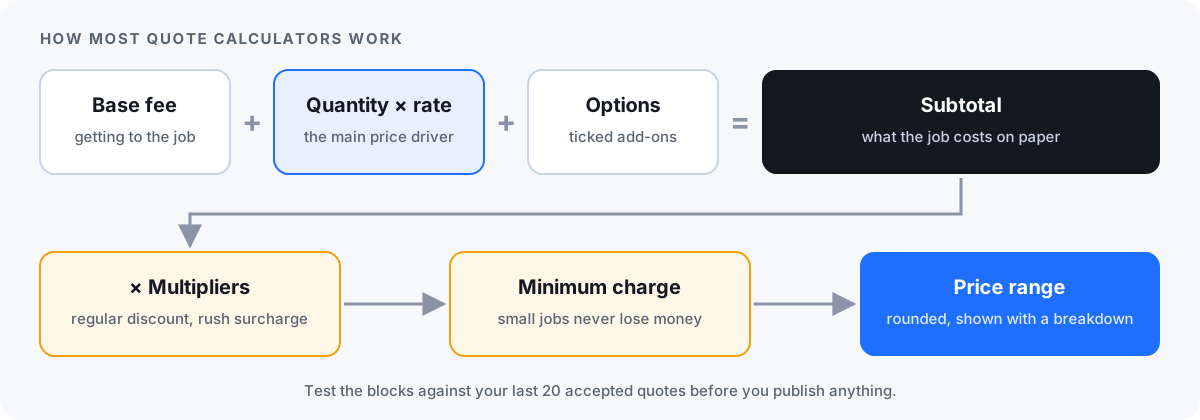
| Block | What it does | Example |
|---|---|---|
| Base fee | Covers getting to the job at all | $35 call-out fee |
| Quantity × rate | The main driver of the price | 2,000 sq ft × $0.015 |
| Options | Fixed add-ons the customer ticks | Kitchen deep clean +$25 |
| Multipliers | Discounts or surcharges on the total | −10% for weekly, +15% for rush |
| Minimum charge | Stops small jobs from losing money | Never below $60 per visit |
| Range and rounding | Leaves room for what the form can't see | Show −5% to +10%, rounded to whole dollars |
A practical way to find your numbers: take your last 20 accepted quotes, list the inputs for each (size, quantity, options), and check whether the six blocks reproduce the prices you actually charged. Where they don't, you have found either a missing question or a rule you apply by gut feeling. Both are worth knowing before you publish anything.
Show a range or a fixed price?
- Fixed price works when the inputs fully describe the job: a print run, a software plan, a standard service package. If you show a fixed price, honour it, or say clearly what would change it.
- A range is safer when condition, access or details only become clear on site. A range like "$57–$66" sets expectations without committing you, and a short line under it ("final price after a free walkthrough") explains why.
- "From" prices are the weakest option: visitors read "from $49" as $49, and the conversation starts with disappointment.
Keep ranges reasonably tight. A range that spans double the lower number answers nothing; if your calculator can only produce that, it is missing a question.
Where to ask for contact details
There are three common patterns, each with a trade-off:
| Pattern | How it works | Good for | Trade-off |
|---|---|---|---|
| Price first | Show the estimate, then offer to send or book it | Building trust, simple services | Some visitors take the price and leave |
| Details first | Ask for an email before showing the price | High-value jobs where every lead matters | Fewer people finish; some type fake addresses |
| Hybrid | Show a range, offer an exact quote or PDF by email | Most service businesses | Needs a fast, reliable follow-up |
Whichever pattern you choose, ask only for what you need to reply (usually a name and an email or phone number), say what you will do with it, and don't add people to a newsletter without their consent.
Ways to add a quote calculator to your website
| Option | Fits when | Price (checked Nov 2026) | Watch out for |
|---|---|---|---|
| Calculator builder (e.g. Calconic) | You want a calculator widget and will build the formulas yourself | Free: 5 calculators, 500 impressions/month; Light: $5/month billed annually | Impression limits; lead emails need a paid plan |
| Quote form for service businesses (e.g. Quotewise) | You price by the job and want trade templates | Free: 1 calculator, 25 requests/month; Pro: $39/month billed yearly | Built around service quotes, not complex products |
| Funnel builder (e.g. involve.me) | You want follow-up emails and lead scoring around the calculator | Free: 50 submissions or 500 visits/month; paid from $29/month billed annually | Priced per live funnel; more than a calculator if you only need one |
| Form builder with calculations (e.g. Jotform) | Simple totals inside a form you already use | Free: 5 forms, 100 submissions/month; Bronze: $34/month billed annually | Complex pricing gets awkward; paid plans are single-user |
| Custom calculator | Your pricing, data or integrations don't fit a builder | One-off project cost plus hosting | Needs a developer to build and update it |
For a single, simple calculator, a builder is usually the right start: you can test whether visitors use it before spending more. Embed it on the service page where people decide, not on a separate "calculator" page nobody visits.
Build it in Excel or Google Sheets first
Whatever tool you end up with, prototype the logic in a spreadsheet. Put the inputs in one column, the six blocks as formulas below, and test it against your last 20 quotes. The spreadsheet then becomes the specification for the builder or the developer, and later the test sheet that proves the website gives the same answers.
Excel can also put a calculator online directly: you can embed a workbook from OneDrive in a web page, and converters can run its formulas behind a proper interface. Our guide to turning Excel into a web app compares those routes.
What to do with the quote requests
- Reply quickly. A visitor who just priced the job is ready to talk now, not next week.
- Keep the answers with the request. The size, options and price they saw should arrive in the email or CRM, so nobody asks the same questions again.
- Follow up once. A single reminder to people who haven't replied is useful; a sequence of five is not.
- Look at the data. Which options do people pick, and which quotes turn into jobs? That tells you where your prices or questions are off.
- Review prices regularly. An out-of-date calculator quietly quotes last year's rates to every visitor.
When a custom quote calculator makes sense
Builders cover most simple cases. A custom calculator is worth considering when:
- The price depends on data you hold elsewhere, such as stock, supplier prices, availability or a price list that changes weekly.
- You need distance or travel time from an address, delivery zones or several locations.
- The quote should create a booking, take a deposit, or go straight into your quoting, CRM or accounting software.
- You have many products or variants, or the logic has outgrown what a formula editor can show clearly.
- You want the calculator to look and behave like the rest of your site, without per-visit limits.
TinyBuild builds this kind of focused tool. Send us your price list or the spreadsheet you quote from, and in a free assessment we will tell you whether a builder would do the job. If custom makes sense, you get a fixed quote and a working calculator demo with your own questions and pricing rules in about 3 days. Related reading: small business workflow automation and software development for small businesses.
FAQ
What is an instant quote calculator?
It is a small tool on your website that asks visitors about the job, such as size, quantity, options and timing, runs your pricing rules on the answers, and shows a price or price range straight away. Most also let the visitor send the quote to you as a request, with their answers attached.
How do I add a quote calculator to my website?
Write down your pricing rules first, then build the calculator in a calculator or form builder such as Calconic, Quotewise, involve.me or Jotform, and paste the embed code into the page where visitors choose your service. Most builders support WordPress, Wix, Squarespace and plain HTML. If your pricing depends on other systems, a custom calculator is the alternative.
Should I show a price range or a fixed price?
Show a fixed price only when the visitor's answers fully describe the job. Otherwise show a reasonably tight range and say what decides the final price, for example a free walkthrough. Avoid "from" prices, which visitors tend to read as the actual price.
Can I make a quote calculator in Excel or Google Sheets?
Yes, and it is the best place to start. Build the inputs and pricing formulas in a sheet, test them against real past quotes, and then use the sheet as the specification for a website calculator. You can also embed an Excel workbook from OneDrive on a web page, though visitors then see a spreadsheet rather than a form.
How much does a quote calculator cost?
Several builders have free plans with limits: Calconic (5 calculators, 500 impressions a month), Quotewise (1 calculator, 25 requests a month), involve.me (50 submissions or 500 visits a month) and Jotform (100 submissions a month). Paid plans checked in November 2026 start at $5 to $39 a month. A custom calculator is a one-off project cost plus hosting.
Should the calculator ask for an email before showing the price?
Asking first collects more contact details per finished calculation but fewer people finish, and some enter fake addresses. Showing the price first builds trust. Many service businesses use a hybrid: show a range, then offer an exact quote or booking by email.
Sources and scope
Plans and prices were checked on vendor pages in November 2026: Calconic pricing, Quotewise pricing, involve.me pricing, Jotform pricing, and Microsoft's guide to embedding an Excel workbook. Prices are US list prices before tax and change often; confirm them before you decide. The example calculator uses made-up prices. TinyBuild is not affiliated with any of these products.
Send us your price list, get a working quote calculator demo
Share how you price a typical job today, even if it is a spreadsheet or notes. Free assessment, an honest tool recommendation, and if custom makes sense, a fixed quote and a working demo in about 3 days.
Share your idea →