
Most business software starts life as a spreadsheet. A quote calculator, an order tracker, a job list, a stock sheet. It works, until five people edit it at once, someone overwrites a formula, and nobody is sure which copy is current.
Turning that file into a web app is now easier than ever. No-code builders read spreadsheets directly, converters keep your formulas running, and AI app builders will generate an app from an uploaded file. The hard part is no longer building something; it is choosing the route that fits your spreadsheet, so you don't pay per user forever for a tool that can't hold your rules.
This guide covers how to tell what kind of spreadsheet you have, six ways to turn Excel into a web app with prices checked against vendor pages in November 2026, what happens to your formulas, a realistic cost comparison for a 25-person team, and a migration checklist you can use whichever route you pick.
First, what kind of spreadsheet do you have?
"Excel to web app" means three very different things depending on what the file does. Before comparing tools, decide which of these describes yours:
| Type | What it looks like | Examples | What the app needs to do |
|---|---|---|---|
| Calculator | A few input cells, lots of formulas, one result | Quote or pricing calculator, configurator, ROI model | Collect inputs, run the same maths, show the result, maybe save it |
| Tracker | One row per record, people add and update rows | Orders, jobs, inventory, requests, leads | Forms, a shared list, statuses, permissions, history |
| Report | Data pasted in, pivots and charts on top | Weekly sales report, KPI sheet | Import data automatically, show a dashboard |
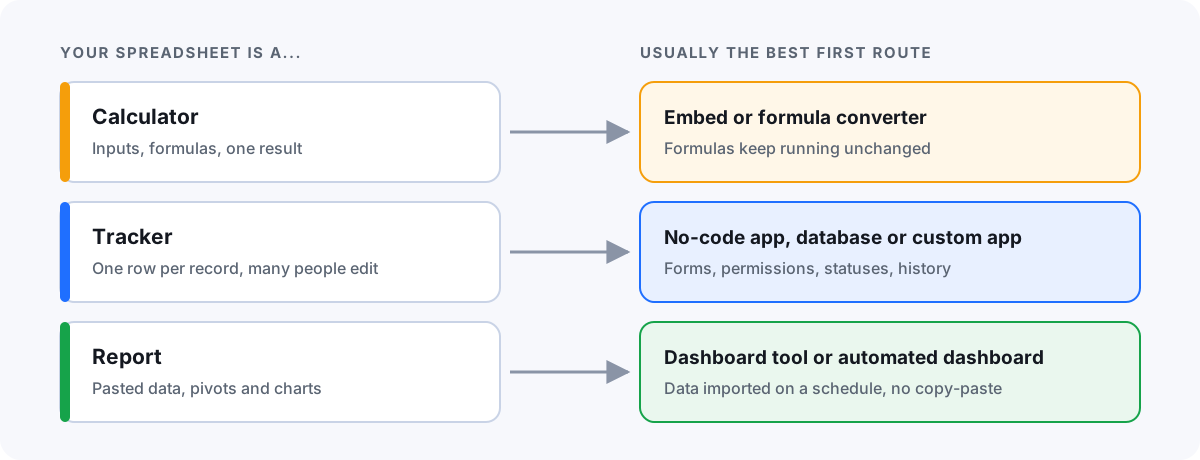
Many real files mix the three: a tracker tab, a calculation tab and a summary tab. That is fine; the point is to know which part is the actual job, because each route below is good at one of them and weak at the others.
Signs you have outgrown Excel
- Several people edit the file and you regularly find conflicting copies or overwritten rows.
- Someone has to be "the Excel person", and work stops when they are on holiday.
- Formulas break when a row is inserted, and nobody notices until a number looks wrong.
- You email the file to customers or partners and wish they could only see their own rows.
- Data is typed in twice: once into the spreadsheet, once into another system.
- You need to know who changed what and when, and the file can't tell you.
- Staff need it on a phone, in a warehouse or on a job site, not at a desk.
One or two of these can be fixed inside Excel or Google Sheets with protected ranges, data validation and sharing settings. Three or more usually means the file has become an application that is pretending to be a spreadsheet.
Six ways to turn Excel into a web app
| Route | Best for | Your formulas | Price (checked Nov 2026) | Watch out for |
|---|---|---|---|---|
| Embed with Excel for the web | Showing a calculator or table on a web page | Keep working | No extra cost with OneDrive | Visitors see a spreadsheet, not an app; embedded workbooks can't be edited |
| Formula-preserving converter (e.g. SpreadsheetWeb) | Calculators and pricing models | Run as they are | SpreadsheetWeb: free tier (1 app, 0.5 MB workbook, 300 sessions a month); Basic $30/month billed annually | Workbook size limits; Solver, Goal Seek and Power Query not available on its hosted plans |
| No-code app on top of a sheet (AppSheet, Glide) | Simple trackers with forms and lists | Rebuilt as app columns and rules | AppSheet: $5, $10 or $20 per user/month; Glide Business: $199/month billed annually incl. 30 users | Per-user pricing; row limits (Glide: 25,000 rows per app from spreadsheet sources) |
| Database-first builder (Airtable, Power Apps) | Trackers that need a real database | Rebuilt as formula fields or app logic | Airtable Team: $20 per editor/month billed annually; Power Apps Premium: $20 per user/month billed annually, $22 from January 1, 2027 | You rebuild the workbook by hand; record limits (Airtable Team: 50,000 per base) |
| AI app builder (e.g. Lovable, Bolt) | Fast prototypes and simple internal apps | Re-created as code by the AI | Subscription; plans change often | Someone still has to check the logic, data security and hosting |
| Custom web app | Specific rules, many users, integrations | Rewritten as tested code | One-off project cost plus hosting | Needs a developer to build and maintain it |
1. Embed the workbook with Excel for the web
Store the workbook in OneDrive, choose Embed, and paste the generated code into your site. Visitors can sort, filter and calculate in the embedded view, and updates to the file show up automatically. It is the quickest way to put a calculator online, but it is still a spreadsheet in a frame: there are no roles, no saved submissions and no real mobile experience.
2. Use a converter that keeps your formulas
Converters such as SpreadsheetWeb or Molnify wrap a web interface around the workbook and run your formulas on their servers. SpreadsheetWeb, for example, lists 505 supported Excel functions on every plan. This is the right route for calculators where the maths must match the spreadsheet exactly. It is a poor fit for trackers, because the workbook stays the engine and multi-user record keeping is not what a calculation engine is for.
3. Build a no-code app on top of the sheet
AppSheet and Glide read rows from Google Sheets or Excel and turn them into forms, lists and detail screens. AppSheet lets you build and test with up to 10 users at no cost, and its Core plan is included in most paid Google Workspace plans, which makes it the obvious first try for teams already on Workspace. Watch the pricing model: AppSheet counts every user who opens an app, and Glide plans cap how many rows a spreadsheet-backed app can hold.
4. Move the data into Airtable or Power Apps
Airtable and Power Apps give you a real database, and you rebuild the spreadsheet inside them: tables, linked records, formula fields, forms and views. Airtable only bills people with edit (or comment) access, so read-only users are free. Power Apps fits companies that already run on Microsoft 365, but every user who runs the app needs a licence, and Microsoft has announced the Premium plan rises from $20 to $22 per user per month on January 1, 2027.
5. Let an AI app builder generate the app
AI app builders are the newest option. Lovable, for example, says you can upload a spreadsheet and ask it to turn the file into an app with filters, search and role-based access; Bolt suggests describing your columns, rules and users as the spec. For a first version this is remarkably fast. The catch is the same as with any generated code: someone has to check that the calculations match the spreadsheet, that each user only sees their own data, and that the app is hosted, backed up and maintained. If nobody on the team can review that, treat the result as a prototype.
6. Have a custom web app built
A developer rebuilds the spreadsheet as a web app with its own database: your forms, your rules, your permissions, and connections to the systems you already use. There is no per-user fee and no row limit, and you own the code. The trade-off is an upfront project and someone responsible for maintenance. It pays off when the spreadsheet runs a core process, has many users, or needs integrations the platforms above can't do well.
What happens to your formulas and macros?
This is where most migrations go wrong, so decide it explicitly:
- Kept as they are: only the embed and converter routes run your actual Excel formulas. Everything else re-creates the logic.
- Re-created: no-code tools, Airtable and Power Apps use their own formula languages; AI builders and developers write code. Each formula is a business rule that needs to be found, understood and tested.
- Macros (VBA): plan to rebuild them as app logic or automations. They describe a process ("when this is filled in, copy it there and email finance"), and that process is often the most valuable part to automate properly.
- Hidden rules: conditional formatting ("red means overdue"), colour codes and comments often carry rules nobody wrote down. List them before you start.
A practical test: pick ten real rows or scenarios, write down what the spreadsheet outputs, and check the new app produces the same results before anyone switches over.
What it costs for a 25-person team
Per-user pricing looks small until you multiply it. Here is a list-price comparison for a team of 25 people who all need to use the app, billed annually, using the prices quoted above:
| Tool and plan | Monthly cost for 25 users | Per year | Note |
|---|---|---|---|
| AppSheet Core | $250 | $3,000 | Included in most paid Google Workspace plans |
| Glide Business | $199 | $2,388 | 30 users included; $5 per extra user |
| Airtable Team | Up to $500 | Up to $6,000 | Only editors and commenters are billed |
| Power Apps Premium | $500 ($550 from 2027) | $6,000 ($6,600) | Each user needs a licence |
None of these is expensive for what they do, and for many teams one of them is the right answer. The numbers matter in two situations: when the user count grows (customers, drivers, seasonal staff), and when you are paying for a platform but still working around its limits. That is usually the point where a one-off custom build becomes the cheaper option over two or three years.
Migration checklist: from spreadsheet to app
- Map the tabs. Label each tab as data, calculation or report. This tells you which route fits and what to build first.
- Clean the data. One row per record, one type per column, no merged cells, and a unique ID for each row. Every route needs this.
- List users and permissions. Who adds, who edits, who approves, who only reads, and who must not see certain rows or columns.
- Write down the rules. Formulas, validation lists, conditional formatting and macros, each as one plain sentence.
- Pick one source of truth. After the switch, the app is the master and the spreadsheet becomes an export, not the other way round.
- Build the core workflow first. The one process people use daily, not every tab at once.
- Test with real scenarios against the spreadsheet's results, then run both in parallel for a week or two.
- Keep an exit. Make sure you can export all data as CSV, whichever tool you choose.
If the file is mostly a report, you may not need an app at all: our free CSV sales dashboard turns an exported spreadsheet into a dashboard in the browser, and the sales dashboard guide covers when to automate it.
When a custom app makes sense
Choose a no-code tool first if it covers your process. A custom web app is worth it when:
- The spreadsheet runs a core process, such as quoting, orders, jobs or approvals, and mistakes cost real money.
- You need different views for different people, including customers or partners outside the company.
- The rules are specific to your business and keep breaking in generic tools.
- Data has to flow to and from other systems, such as your shop, accounting software or a warehouse scanner.
- Per-user fees would grow with every new employee, driver or customer.
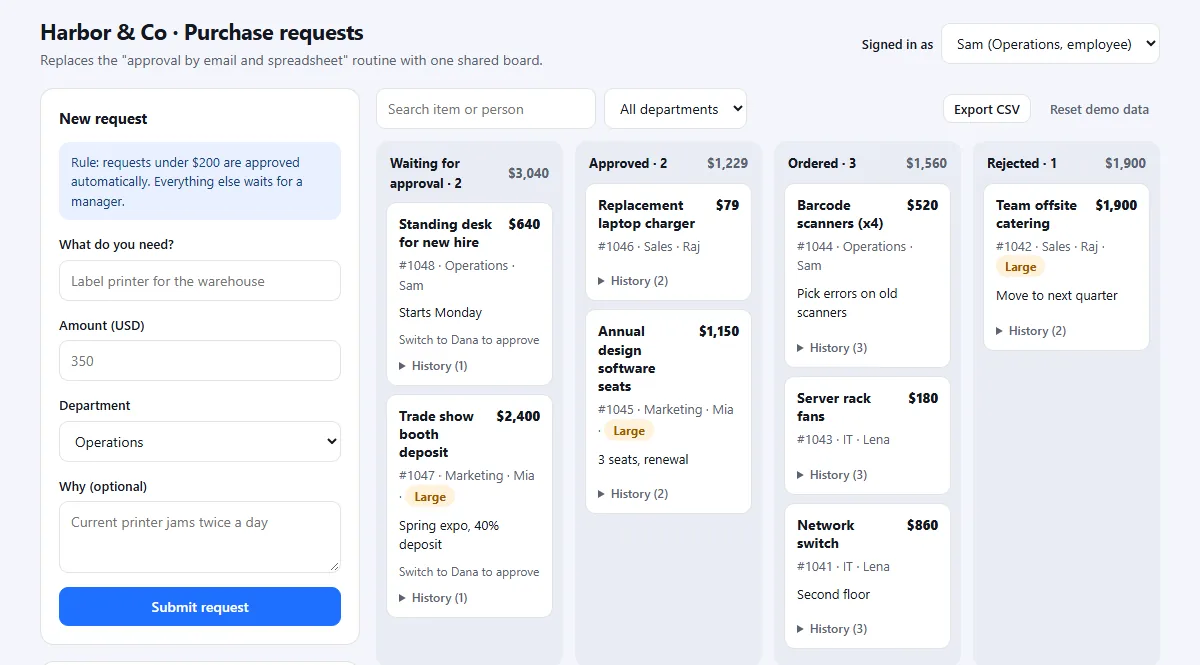
Two of our sample demos show what this looks like. The approval tool demo replaces an "approve by email and spreadsheet" routine with one shared board, and the sales dashboard demo replaces a weekly spreadsheet report. Both are deliberately simplified samples with fictional data.
How TinyBuild turns spreadsheets into apps
Send us a copy of the spreadsheet with sensitive data removed, and tell us who uses it and what goes wrong. In a free assessment we tell you honestly whether AppSheet, Airtable or another tool would do the job. If a custom app makes sense, you get a fixed quote and a working demo of the core workflow in about 3 days, built on your own columns and rules, so your team can try it before the full version is built. For more on the first step, see internal tool development and software development for small businesses.
FAQ
Can I convert Excel to a web app for free?
Yes, within limits. Embedding a workbook from OneDrive with Excel for the web costs nothing extra, SpreadsheetWeb has a free tier for one small calculator app, and AppSheet lets you build and test with up to 10 users at no cost. Free options stop at small workbooks, few users or a spreadsheet-style interface.
Can AI turn my spreadsheet into an app?
AI app builders such as Lovable and Bolt can generate a working app from an uploaded spreadsheet or a description of it. That is a fast way to get a first version. Before real use, someone needs to verify the calculations against the spreadsheet, check that users only see the data they should, and take care of hosting and backups.
Will my Excel formulas still work in a web app?
Only if you embed the workbook or use a formula-preserving converter such as SpreadsheetWeb, which runs the formulas as they are. No-code builders, databases, AI builders and custom development re-create the logic, so each formula has to be rebuilt and tested.
Can Excel be used as a database for a website?
For a read-only table or a small calculator, yes, through an embed or a converter. For anything where several people add and change records, a spreadsheet makes a fragile database: no real permissions, limited history and conflicts when people edit at once. Move the data into a proper database once it is shared and changing daily.
How do I turn a Google Sheet into an app?
AppSheet is built for this and connects directly to Google Sheets; its Core plan is included in most paid Google Workspace plans. Glide can also sync with Google Sheets. If the sheet has outgrown those tools, the same checklist applies: clean the data, list the rules and rebuild the core workflow first.
How long does it take to turn a spreadsheet into a web app?
A simple no-code app can be ready in hours or days. A custom app with your rules can be shown as a working demo of the core workflow in about 3 days; the production version, with logins, data migration and testing, takes longer and depends on how many tabs, rules and integrations are involved.
Sources and scope
Prices and limits were checked on vendor pages in November 2026: AppSheet pricing, Glide pricing, Airtable plans, Power Apps pricing and the 2027 Power Apps price update, SpreadsheetWeb Hub pricing, Microsoft's guide to embedding a workbook from OneDrive, Lovable's announcement and Bolt's spreadsheet-to-app guide. Prices are US list prices before tax and change often; confirm them before you decide. TinyBuild is not affiliated with any of these products.
Send us your spreadsheet, get a working app demo
Share a copy with sensitive data removed and tell us who uses it. Free assessment, an honest tool recommendation, and if custom makes sense, a fixed quote and a working demo in about 3 days.
Share your idea →